As interest in alternative social platforms continues to grow, many Android users have been searching for the best way to download the UpScrolled app. If you’ve landed here trying to figure out how to install it on your Android device, there’s good news: UpScrolled is now available directly on the Google Play Store, making installation quick, simple, and completely safe.
UpScrolled is an independent, people-first social media platform that has surged in popularity — becoming one of the most-downloaded social apps in the United States, Canada, the UK, France, Germany, and Italy. Built around the idea of connecting safely and sharing freely, it promises no data sales, no surveillance, no shadowbans, and no manipulative algorithm working against you. With over 1 million downloads and tens of thousands of reviews on the Play Store, it has quickly established itself as a genuine alternative to Meta, X, and TikTok.
Below is a clear, practical guide on how to download and install UpScrolled on Android — along with a deeper look at what makes the app so special and why so many people are making the switch.
How to Download UpScrolled from Google Play
Because UpScrolled is available on the official Google Play Store, installing it couldn’t be easier. Apps installed from Google Play are automatically scanned for malware, receive updates automatically, and require no special permissions or workarounds.
Here’s how to install it:
- Open the Google Play Store on your Android device.
- Tap the search bar and type UpScrolled.
- Look for the official app by the developer UpScrolled B.V.
- Tap Install and wait for the download to complete.
- Once installed, tap Open to launch the app.
- Create an account or sign in, and you’re ready to start scrolling.
Installation typically takes less than a minute, and updates arrive automatically whenever the developer releases a new version. That’s the beauty of getting it straight from Google Play — no manual steps, no security concerns, just a clean, official installation.
What Is UpScrolled?
UpScrolled is an independent social media platform built around the people who use it, rather than advertisers or shareholders. Launched in mid-2025 by founder and CEO Issam Hijazi, the app was created out of frustration with how mainstream platforms operate — where algorithms decide who gets heard, creators watch their reach mysteriously drop, and communities sharing their truth find their posts buried.
The platform’s mission is refreshingly simple: give every voice equal power. There are no shadowbans, no algorithmic games, and no pay-to-play favoritism. Instead, UpScrolled offers authentic connection where your content reaches the people who actually follow you. The growth speaks for itself — the platform jumped from around 150,000 users at launch to millions through word-of-mouth alone, a rare feat in a space dominated by Big Tech giants.
Key Features That Make UpScrolled Stand Out
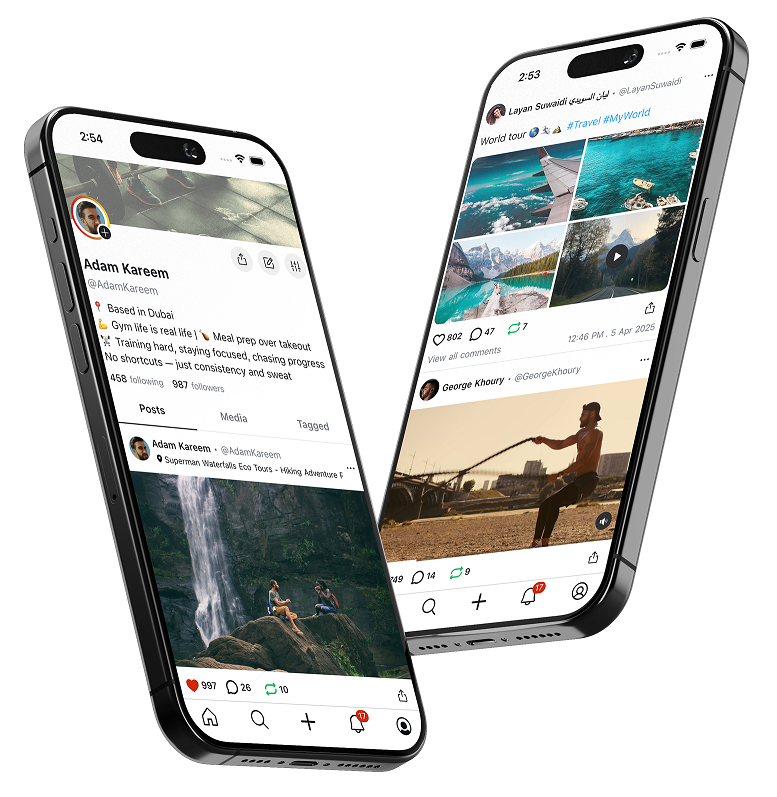
If you’ve used Instagram, X, or TikTok, UpScrolled will feel instantly familiar — but with a philosophy that puts you in control. Here’s what you get inside the app:
- A chronological feed you control: The accounts you follow appear in the order they posted — no reshuffling, no manipulation, no algorithm deciding what you see.
- Rich content posting: Share text, photos, and both short and long videos, giving you flexibility that most single-purpose apps don’t offer.
- Built-in video editing tools: Create and refine content your way, right inside the app.
- Real-time chat: Message anyone, anytime, with a smooth, responsive messaging experience.
- Daily stories: Share quick, spontaneous moments from your day with the people who follow you.
- Discovery page: Surface fresh voices alongside established ones, with a transparent ranking based on likes, comments, and reshares — no hidden agenda.
- Trending topics and Global Awareness categories: Follow the conversations and causes that matter to you, locally and worldwide.
- Profile customization: Build a profile that genuinely reflects who you are.
- Multi-language support: Available in English, Arabic, Spanish, Italian, French, and German, with the ability to translate user posts into 50+ languages via a built-in Translate button.
- Powerful safety tools: Effective mute, block, and report features, plus trustworthy verification and transparent moderation aligned to published community guidelines.
Privacy Built In, Not Bolted On
One of UpScrolled’s biggest selling points is its approach to privacy. Unlike platforms that treat your personal data as a product to be sold, UpScrolled states clearly that it does not sell your data, does not train AI on it, and does not build surveillance profiles. Data is encrypted in transit, no information is shared with third parties, and if you delete your account, your data goes with you.
Privacy controls are available from day one rather than being an afterthought, and the company has been transparent about how it operates — including where its servers are hosted and its use of global content delivery networks to keep the app fast and responsive worldwide. This kind of openness is exactly what has drawn privacy-conscious users away from mainstream platforms.
Why Users Love UpScrolled
Backed by thousands of five-star reviews, UpScrolled has earned a loyal and rapidly growing community. Users consistently praise the app for its clean, intuitive interface, its fast and smooth performance, and its refreshing lack of algorithmic manipulation. Many describe it as a “breath of fresh air” in a social media landscape that often feels cluttered, pushy, and designed to keep you endlessly scrolling.
Creators in particular appreciate that their reach is determined by the community they build rather than a black-box algorithm. Everyday users enjoy the freedom to express themselves and connect authentically, while those migrating from platforms like Instagram and X have noted how easy the app is to pick up and use. The combination of familiar functionality, ethical design, and genuine community feel has turned casual downloaders into passionate advocates.
A Familiar Experience With a Better Philosophy
What makes UpScrolled compelling isn’t that it reinvents social media — it’s that it takes everything people already love about it and strips away the parts that people hate. You still get stories, feeds, chat, discovery, and video, but without the shadowbanning, the invasive data harvesting, or the sense that the platform is working against you. It’s social media that’s designed to let you log off feeling good, rather than trapping you in an endless loop.
The app is rated Mature 17+, contains ads, and offers in-app purchases, but the core experience is free and accessible to anyone who wants to join. As the platform continues to expand its features and language support, it’s positioning itself as one of the most promising independent alternatives on the market.
Final Thoughts
If you’ve been trying to download the UpScrolled app, you can now find it right where you’d expect — on the Google Play Store. With over a million downloads, a fast-growing global community, and a mission centered on freedom, privacy, and authentic connection, it has firmly established itself as a leading alternative to mainstream social media.
Downloading it is as simple as searching for “UpScrolled” in the Play Store and tapping Install. Within a minute, you’ll be ready to scroll differently — on a platform that genuinely puts you, the user, first. If you’ve grown tired of algorithms, shadowbans, and data harvesting, UpScrolled is well worth a try.