
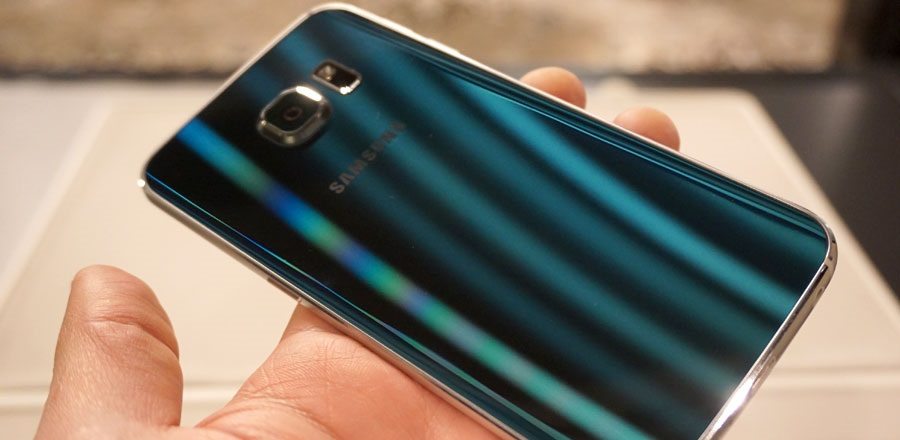
Is your Samsung Galaxy S6 stuck at the Samsung logo when you power on your phone? Then, I have found every possible fix for this issue. So move on with the guide; it will help you fix your Galaxy S6 if it’s stuck on the startup screen at the Samsung Logo.
Samsung Galaxy S6 is one of the most adored Samsung phones of the Galaxy series of its time. It has top-notch specs and a sleek and stylish body. It has everything that it takes to be the number one smartphone. Great processing power with 3 GB RAM and Exynos 7420 Octa-core processor. It has good battery life and fantastic picture quality.
While tweaking with custom ROMs or recoveries, sometimes you end up bricking up your phone; in simple words, your phone won’t pass the Samsung logo screen, and it will fail to load the operating system. It will be stuck in a bootloop. Don’t worry; it can be fixed easily. It is soft-bricked. There are several ways to fix this issue. The one I have stated in this guide is 100% working and easy to perform. It might look technical for the newbies who have never tried flashing firmware or recoveries on their phones. You don’t need to worry if it is your first time flashing firmware via ODIN. Just perform the step-by-step guide on how to fix the Galaxy S6 stuck at the Samsung Logo.
Galaxy S6 Stuck at Samsung Logo Solution:
The solution I will recommend for Galaxy S6 stuck at the Samsung logo is to flash stock firmware using ODIN on your phone. It will unbrick your phone. It just takes a few steps, and it is pretty straightforward. You will reinstall the operating system on your Samsung Galaxy S6.
Note: Know that performing this guide will fix the Galaxy S6 stuck at the Samsung Logo, but it will erase all your data present on the phone
Prerequisites:
- Download ODIN v3.10.7 from here.
- Download Stock Firmware for your Galaxy S6 from SamMobile. And extract it on your PC.
- Download Samsung Drivers for Windows. (The link to download the file is under the main heading). Although these drivers are to be installed on your PC, they are essential for your PC to recognize your device correctly.
- You will need a computer for this solution.
Selecting the correct firmware is very important. If your phone is carrier unlocked and has no carrier branding, you can download the firmware of any country that is not branded. To check the brand. See if some carrier logo (like Verizon or T-Mobile) appears when you reboot your phone. If your phone is not branded, you can flash a firmware of any country that is not carrier-specific. Make sure you don’t flash unbranded firmware on a branded phone. Although, it is recommended to find the same firmware as the one installed on your phone before it gets bricked. Suppose you found the same firmware installed on your Galaxy S6. Your data present inside your Galaxy S6 won’t be deleted.
Checkout: Get the Always On Display feature on Galaxy S6
Follow the below steps to flash stock ROM on your Galaxy S6:
- Download ODIN on your PC.
- Install Samsung USB drivers for Windows on your PC or laptop.
- Now turn off your Galaxy S6 and Get it into Download mode. Press the Volume Down, Power button, and Home Button simultaneously. Keep on holding till you see a warning.
- Press the Volume Up button to continue.
- Now open ODIN on your Windows PC.
- Connect your phone to your PC using a USB data cable. ID: COM will turn blue, indicating that your PC connects and recognizes your phone. Suppose your phone is not recognized. Make sure you have installed proper Samsung drivers on your computer.
- Click on AP or, in some ODIN versions, PDA.
- Select the stock ROM with (.MD5 file extension) you downloaded from Sammobile.
- Ensure only Reboot and F. Reset Time are checked in the options, like in the screenshot below.


That’s it. Click on Start and wait for 10 minutes. Now, ODIN will flash Stock ROM on your Galaxy S6. That’s how to fix the Galaxy S6 stuck at the Samsung logo. Your phone will reboot on its own after the flashing.
Note: If the ROM you downloaded extracts more than one file, then follow the three additional steps below:
- Put the BL file in the BL tab.
- Select the tab and select the CP file in it.
- Finally, select the tab and select the HOME_CSC file in it.
If the flashing is unsuccessful. Try using another version of ODIN again.
“Update”
If you are reluctant to flash stock ROM using ODIN to fix Galaxy S6 stuck at the Samsung logo or Bootloop. Then, use Smart Switch. It’s the official software from Samsung and is very easy to use. And it does the same job. Watch the tutorial in this guide.
Comment below if you have any queries about fixing the Galaxy S6 stuck at the Samsung logo. You can also give your feedback in the comments. Feel free to ask me in the comments if you have any other issues.











Oh man i am sooooo lucky that i found this post man thank you soooooooooooooooooooo much hope carma helps you out some day thank you thanks a lot many thanks
I am glad it worked out for you.!
You can help us by sharing the different posts of this site with your friends and on your social networks.
We are bunch of College guys working to help others by making Guides on Android phone problems and their solution.
i cant fix that yet .
Did you try the above procedure as it is?
If you need some help. You can ask me. This is proven solution if Samsung Galaxy S6 is stuck at bootloop at startup.
I’ve tried Odin v3.07, 3.09, 3.10.6 and 3.11.1 but they don’t Work. 3.10.6 says a fail while the other 3 just don’t even start properly. Can you help with this?
Sorry for the questions but these are some issues that could cause ODIN not to work.
I’ve tried 2 different versions of ODIN including the latest. it says PASS when it´s finished but the phone is still stuck on the Samsung logo. please help
Hi Alicia.
I am afraid your phone is hard-bricked.
Try to mount cache partition using this guide.
Best of Luck.
I have no idea if I am doing this right. I downloaded the driver, the Odin and the firmware. I clicked on start (Com was Blue) but, I do not know if anything happened. The T-Mobile rep could not do anything to fix this issue. I am also trying to wipe it in order to get my upgraded phone.
Did you download the right ROM from SAMMobile?
Downloaded the ROM extracted it and then selected it after clicking on AP?
After you click on start on the right side of ODIN you see the log where it stats if the flashing is successful or not.
If its successful. your phone will reboot and it wont stuck at logo.
If it still gets stuck at logo make sure you are using the right ROM according to your carrier that is T mobile and your country.
Best of luck.
Feel free to ask if you have any more questions.
Sir it passed on ODIN but when rebooted my s6 stuck in samsung startup. please help sir. Thank You!
Sir it passed on ODIN but when rebooted my s6 stuck in samsung startup. please help sir. Thank You
You might have flashed the wrong ROM on your Galaxy S6. Make sure you download the right firmware for your phone.
Does flashing via Odin erase all data? Is there a way to do this without losing data?
If you are flashing exactly the same ROM which is running on your phone then you wont lose data..
thanks so much i was freaking out but this really helped for some reason the sammobile wouldnt let me download the firmware tried like 20 times and it worked after a week or 2 thanks again dude ur a lifesaver
Glad it worked.
Hi, Is there any way I can save the data on my phone? I don’t want to lose everything. Please help.
If you will flash exactly the same firmware on your phone, which is running right now. Your data wont be lost.
Also if you use CSC_HOME of your current firmware instead of the downloaded firmware. Data wont be lost.
my phone wont even let me get to the custom download using the volume up, home button and power button trick. and even if it does work i can’t see as all i see is the samsung logo screen till it disapears then im left with a black screen with the blue led light.
Thank you so much for the information! The people at Verizon told me to do a factory reset to reboot the phone. I am glad to have listened to these instructions instead.
I went through the steps https://uploads.disquscdn.com/images/cbf5ccade8f7e49f6bb279f249bfaca224b6faee2b99be92bd7a964938166c6f.jpg (and paid the $17 for the SamMobile fast download), it looked like it was working, had the download progress in Odin and on the phone screen. Odin finished and it said success…….but phone rebooted and is still stuck at the logo screen. I tried the Odin version you have on the page, as well as the latest version, same results. I went ahead and ordered a new phone, but still would like to get my documents off of this phone.
Any additional recommendations??
Are you sure you installed the right firmware?
If flashing firmware didnt solve the issue, then most probably there is some hardware issue with your phone not software.
Best of luck.
Good question; I just took the latest one for the SM-920V since it was just a security patch and the phone has been working since the release of that version in January. Guess I could just try the other four previous versions. What harm can it do?? Thanks again!!
Try to Match CSC and PDA of firmware with your phone’s firmware. You might not be able to figure out CSC and PDA when your phone is dead. Just go for the firmware according to your country and Brand of phone (if there is any e.g. Verizon, T-Mobile)
And you really didnt have to pay to get that firmware.
Best of Luck
Match CSC and PDA of firmware with the phone’s firmware. But as the phone is not working you might not be able to figure out PDA and CSC. So just go for the firmware of your country along with brand of phone if there is any like (Verizon, T-Mobile)
You didnt really had to buy the Sammobile fast download.
Best of luck.
Let me know what happens.
ive try’d to flash stock but it crashes at hidden.img everytime and with any firmware i use for my phone, please help me get this bit sorted as phone will work if can get the flash to finish with a pass
Try with some other version of ODIN.
Hi Abdula – following your instructions for bricked phone, but can’t download firmware on Sammobile. I found the firmware I need, then it asks me to register to download, which I have, but nowhere to click ‘download’. It just takes me through the register screen when I repeat, even when logged in to my free account. No help on Sammobile, so trying you. Am I missing something?
Now resolved, thanks
Great….!